Key takeaways
- Plan remediation as its own process, with owners and deadlines.
- Triage findings before turning them into work for other teams.
- Assign each finding to a named owner through the asset or business unit it affects.
- Prioritize using exposure, exploitation data and business context, not CVSS alone.
- Group findings that share a fix, record blockers, and retest before closing anything.
Most of the planning in a pentest goes into the test itself: the scope, the testers, the dates, the readout call. Much less goes into what happens after the report is delivered, even though that’s where the risk actually gets reduced.
When we return to clients for follow-up testing, the pattern is familiar. Critical findings were usually fixed quickly. Medium and low findings were often still open, sometimes with no owner and no deadline, and some of them show up again in the new report.
Below is the remediation process we recommend, and how Snapsec VM supports each step.
Triage findings before creating work
It’s tempting to turn every finding into a ticket as soon as the report arrives. The problem is that some of those findings are duplicates of issues already reported by scanners, some are false positives, and some affect components that are no longer in use. If they go straight to engineering, developers spend time investigating issues that don’t need fixing.
Triage first. For each finding, confirm that it can be reproduced, check whether it has already been reported elsewhere, and check that the affected component is actually in use. Findings that don’t hold up should be closed as Duplicate, False Positive or Not Applicable, with a short note explaining why. Those notes are useful later, when an auditor or the next tester asks what happened to a finding.
Confirmed findings move to Triaged and become actual work.
Assign an owner to every finding
A finding assigned to a department, or to nobody, usually waits. Each confirmed finding needs a named person who is responsible for getting it fixed.
We find it works best to assign ownership through the asset or business unit a finding affects, rather than to whoever received the report. The people who own a system are the ones who can deploy a fix, and they stay responsible for it after the security contact who received the report has moved on.
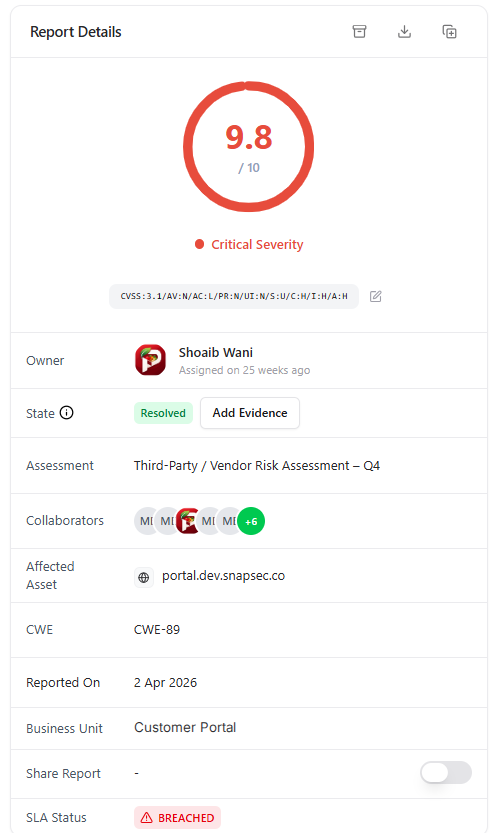
Owner, state, assessment, business unit and SLA status on every finding.
Each finding should also get a deadline based on its severity. Without one, there’s no way to tell whether remediation is on track or falling behind.
Prioritize by real risk
Pentest reports are usually sorted by CVSS base score. That score rates the vulnerability itself, but it doesn’t know whether the affected system is internet-facing, what data it holds, or whether it’s about to be decommissioned.
A few other inputs usually matter more when deciding what to fix first: whether the asset is exposed to the internet, whether the vulnerability is being exploited in the wild (listed in CISA’s KEV catalog or carrying a high EPSS score), what type of asset it is, and which part of the business depends on it.
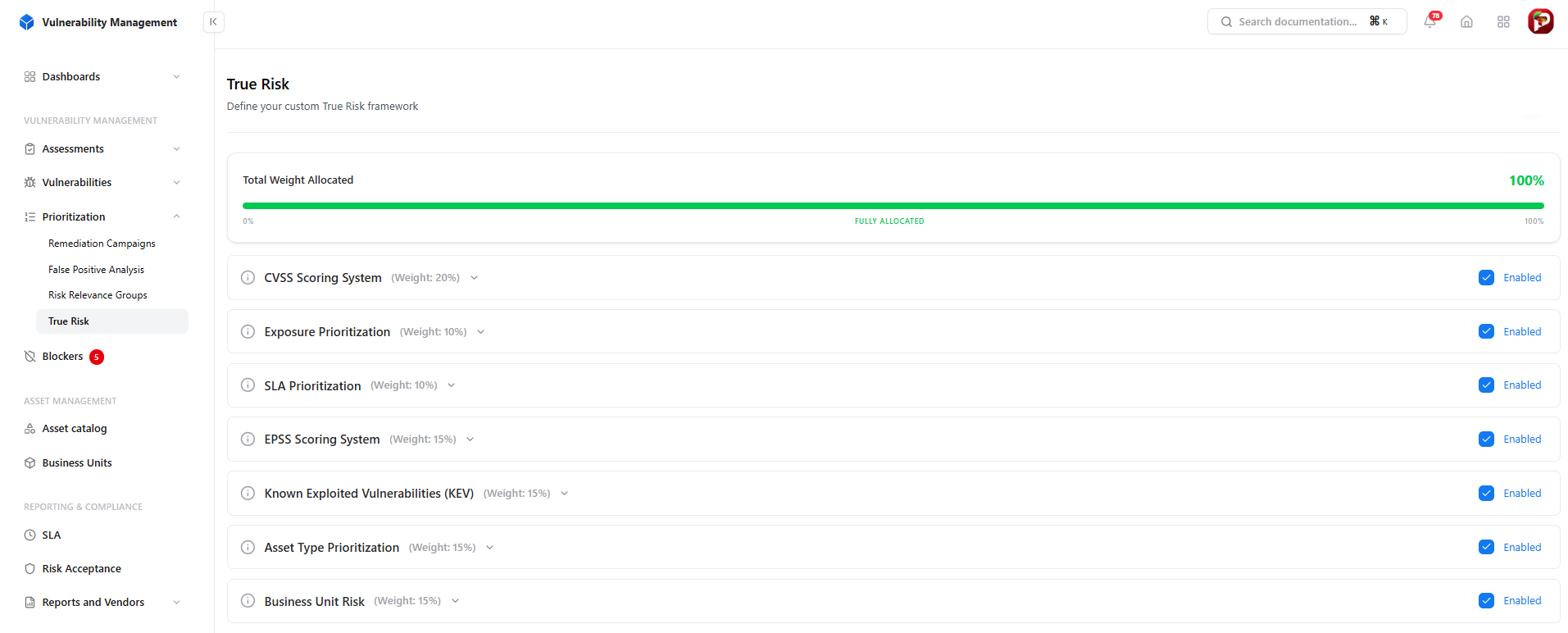
CVSS, EPSS, KEV, exposure, asset type and business unit weighted into one risk score.
Snapsec VM’s True Risk combines these factors into one score, and each factor can be weighted to match how your organization thinks about risk. CVSS is still included, but it no longer decides the order on its own. A medium-severity finding on an exposed payment endpoint can then move ahead of a high-severity finding on an internal test server, which is usually the right call.
Group findings that share a fix
A lot of findings have the same underlying cause. Dozens of findings across different services might come from one outdated library. Several access-control issues might come from the same authorization logic copied into multiple controllers.
Handled one by one, each of those becomes a separate ticket, and the shared cause is easy to miss. Grouped together, they become a single piece of work that closes many findings at once.
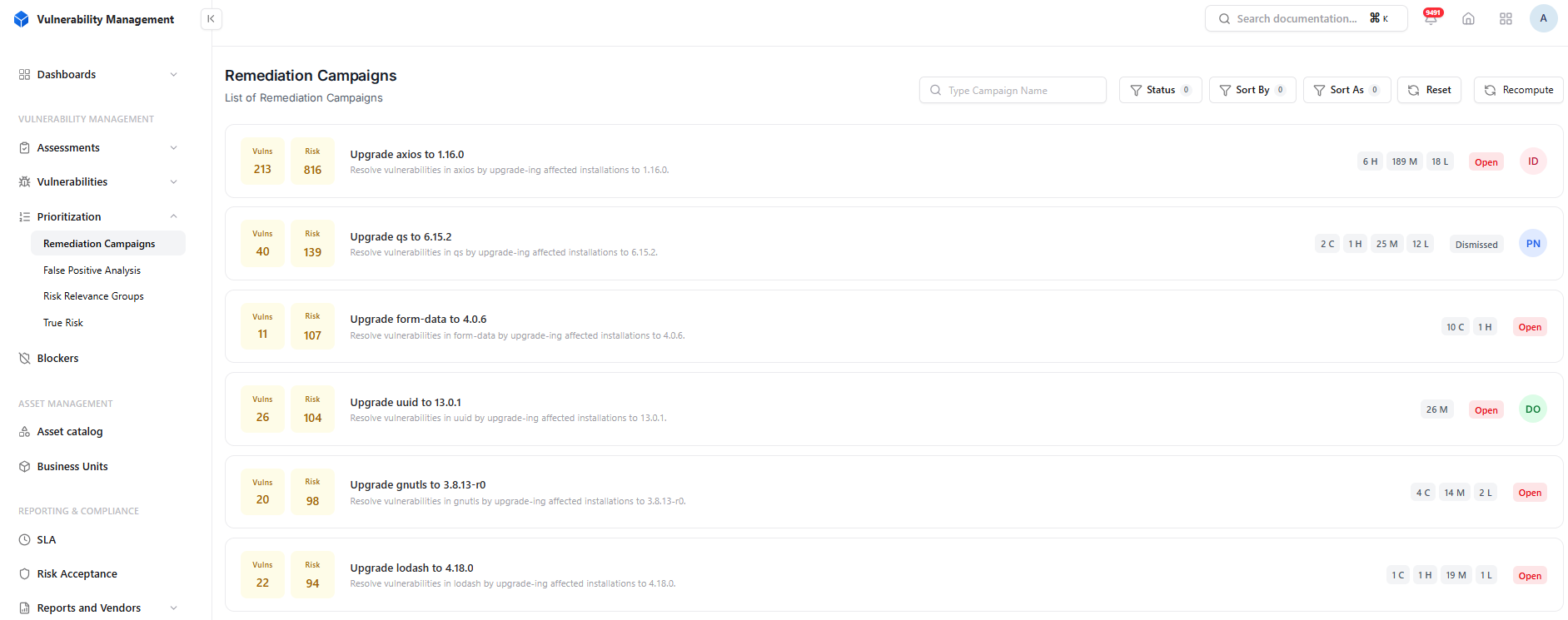
Findings grouped by the fix that resolves them, ranked by combined risk.
In Snapsec VM, Remediation Campaigns group findings by the fix that resolves them, such as upgrading a dependency to a specific version, and rank each campaign by its combined risk. For pentest findings in custom code, grouping by weakness class (CWE) does a similar job. If the same class of issue keeps appearing, the fix probably belongs in a shared component rather than in each endpoint.
Record what’s blocking progress
Some findings stay open for good reasons: the fix depends on a vendor patch, a release window, another team, or an architecture decision. If nobody writes that down, a finding that’s waiting looks the same as one that’s been forgotten.
Record these as blockers, with a short description, a priority and a status.
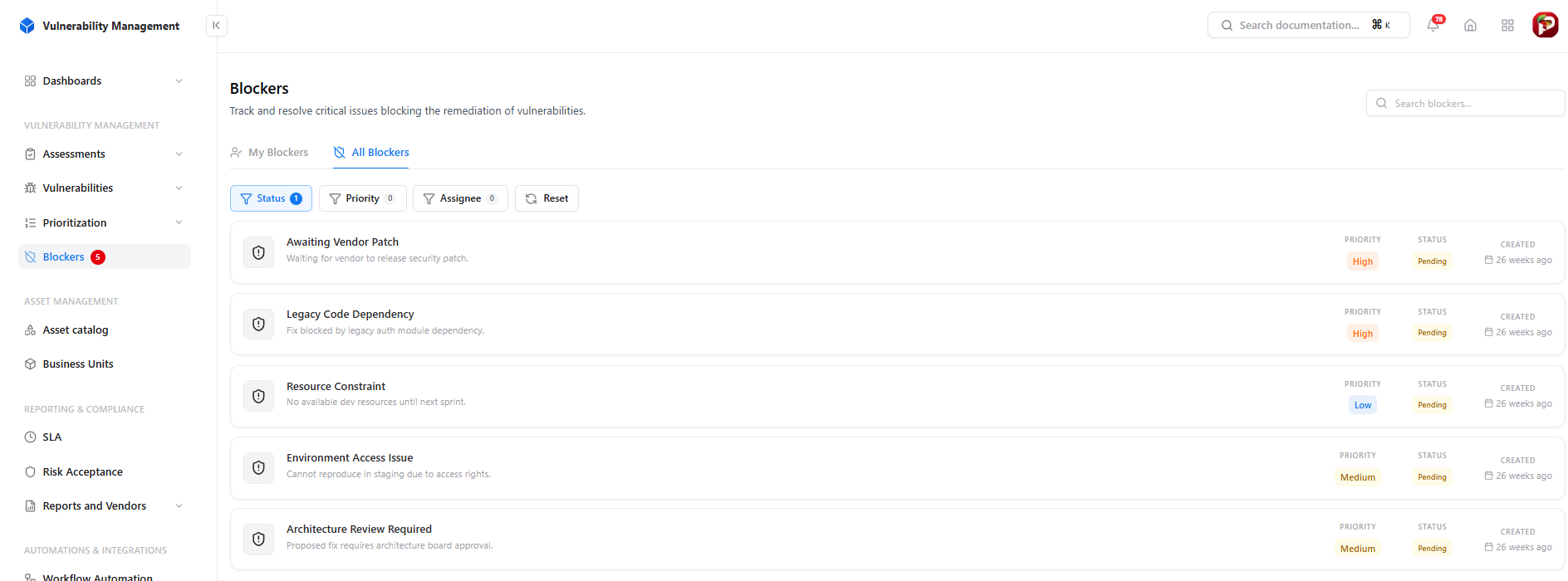
Every obstacle to remediation recorded with a priority and a status.
This helps in two ways. The security team can see why remediation has stalled, and leadership gets a concrete list of dependencies they can help resolve. It also makes SLA reporting fairer, because a delay caused by waiting on a vendor is different from one caused by a finding nobody picked up.
Retest before closing
A developer marking a finding as fixed doesn’t confirm the fix works. In our retests, the common problems are a fix that covers one parameter but not another, one endpoint patched while a similar one isn’t, or a fix that works in staging but never reached production.
Keep these states separate:
- Fixed in Staging: the fix is deployed but hasn’t been verified.
- Retest: a tester replays the original proof of concept and tries the obvious ways around the fix.
- Resolved: the retest passed, and the evidence is attached to the finding.
- Unresolved: the retest failed, and the finding goes back to its owner with its history intact.
Findings that won’t be fixed need a documented risk acceptance instead, with the reason, business justification, compensating controls, approver and a date to review the decision.
Example: working through one pentest
Say a web application pentest produces 34 findings.
During triage, 27 are confirmed. Four duplicate existing scanner findings, two are false positives, and one affects a feature that has already been removed. Those seven are closed with notes.
The remaining 27 are assigned to four owners across two business units, each with a deadline. Prioritization moves a medium-severity finding on an internet-facing payment endpoint, which is on the KEV list, ahead of two high-severity findings on internal tools.
Eleven findings turn out to come from two outdated libraries, so they become two upgrade campaigns. Five access-control findings share the same authorization logic and are fixed together. Three findings are blocked on a vendor patch, and that’s recorded.
Retesting confirms 22 fixes. Two fail and go back to their owners. Three are accepted as risk, with compensating controls and an approver on record.
At the end, the team can account for every one of the 34 findings.
Remediation checklist
| Step | Output | Owner |
|---|---|---|
| Triage | Confirmed findings, with duplicates and false positives closed with notes | Security team |
| Ownership | A named owner and deadline for each finding | Asset or business unit owner |
| Prioritization | A queue ordered by real risk | Security team |
| Campaigns | Related findings grouped under one fix | Engineering lead |
| Blockers | A record of dependencies and delays | Finding owner |
| Retest | Verified fixes with evidence attached | Tester |
| Risk acceptance | Documented, approved exceptions | Business owner, with security sign-off |
Conclusion
A pentest tells you what was exploitable at the time of testing. Reducing the risk depends on what happens afterwards: confirming findings, giving them owners, fixing them in a sensible order, and checking that the fixes work.
Snapsec VM is built to support that process. Each finding has an owner, a state, a business unit and an SLA status. True Risk orders the queue using CVSS, EPSS, KEV, exposure and business context. Remediation Campaigns group findings by the fix that resolves them, Blockers record what’s holding work up, and retests decide when a finding is actually resolved. Explore the live demo to see how it works.
Frequently asked questions
How quickly should pentest findings be fixed?
That depends on your internal policy and any compliance requirements. Most organizations set deadlines by severity, with critical findings expected within days and lower-severity ones within weeks or months. The important part is that every finding has a deadline and someone tracks it.
Should every pentest finding become a Jira ticket?
Only confirmed ones. Triage first so developers aren’t asked to investigate duplicates or false positives, and combine findings that share a fix into a single piece of work.
Who should retest a fix?
Preferably the original testers, or someone other than the person who made the fix. At a minimum, the retest should replay the original proof of concept and check for obvious bypasses.
What happens if a retest fails?
The finding should go back to its owner as the same finding, not a new one, so its history, deadline and evidence stay together.