Key takeaways
- Auditors look beyond the pentest report. They want evidence of scope, findings, remediation and accepted risk.
- Store engagement documents with the assessment they belong to.
- Keep proof of concept, ownership and activity history on each finding.
- Treat retest evidence as the proof of remediation, not a closed ticket.
- Record every accepted risk with a justification, compensating controls and an approver.
Most security teams do the work auditors ask about. They scope their pentests, fix findings and make reasoned decisions about the risks they accept. The difficulty comes later, when that work has to be proven. Scope documents sit in email, authorization letters in shared drives, fixes in a ticketing system, and risk decisions in chat threads. Preparing for an audit then means reconstructing a year of activity from several tools.
The fix is to organize evidence where the work happens, so it’s already complete when an auditor asks for it.
What auditors ask for
Frameworks differ in wording, but reviews of a pentest program tend to cover the same ground. PCI DSS v4.0 requirement 11.4, for example, expects a defined penetration testing methodology, testing at least annually and after significant changes, and exploitable vulnerabilities corrected and retested. ISO 27001 and SOC 2 reviews typically raise similar questions.
Most request lists reduce to five areas:
- Scope: what was tested, when, by whom, and under what rules of engagement
- Findings: what was found, with severity and supporting evidence
- Ownership and timelines: who was responsible for each fix, and whether remediation deadlines were met
- Proof of remediation: evidence that fixes were verified
- Exceptions: findings left unfixed, with the reason, the approver and any compensating controls
When these five areas are stored together, audit preparation is mostly a matter of exporting what already exists.
Store engagement documents with the assessment
Some evidence exists before testing starts: the scope document, signed rules of engagement, the test plan and any authorization letters. Together they show that the test was authorized and covered what it was meant to cover.
Store these documents with the assessment rather than in a general file share. When an auditor asks for the scope and authorization of a specific test, the answer should be in the record for that test, dated and attached.
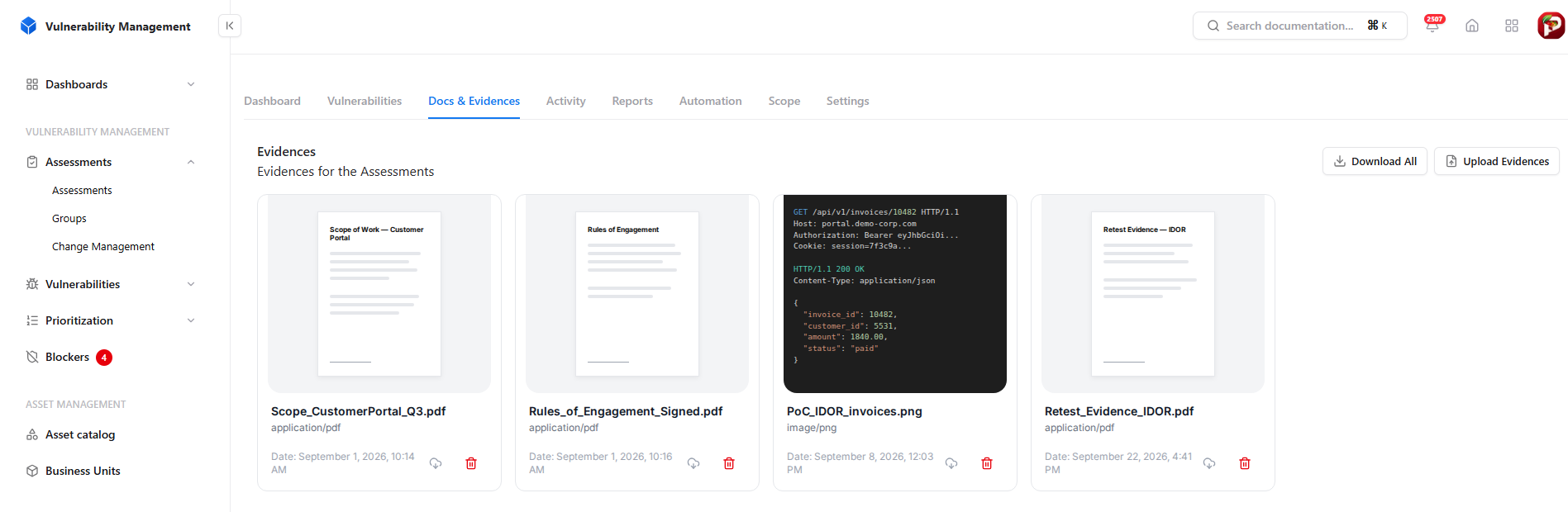
Scope, rules of engagement, PoC captures and retest evidence stored with the assessment.
Evidence produced during and after testing belongs in the same place, including proof-of-concept captures, request and response logs, and retest results. A single record per engagement means a complete evidence package can be downloaded at once.
The aim isn’t to collect evidence for an audit. It’s to make evidence a byproduct of how the security team already works.
Keep evidence at the finding level
Auditors usually sample individual findings and ask for their full history. Each finding should therefore carry:
- A description and steps to reproduce, so it can be understood without the original tester
- Proof of concept, such as a screenshot, a request and response pair, or a short script
- An owner and current state
- An activity history, covering assignments, comments, state changes and automated actions, each with a timestamp and an actor
The activity history is the part most teams can’t produce. A spreadsheet row records where a finding stands today. It doesn’t record when it was assigned, when the fix reached staging, when it was retested, or who did each step.
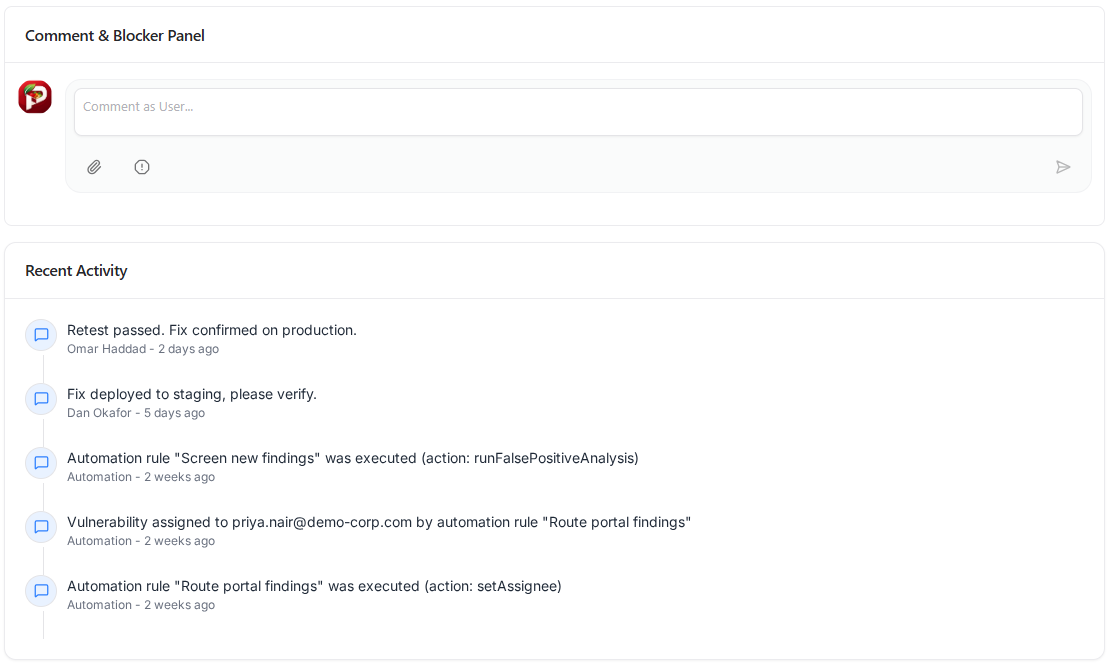
Every assignment, comment and automated action, timestamped and attributed.
A complete trail answers most sampling questions directly. It also covers actions taken by workflow automation, which is worth being able to show as more of the process is automated.
Prove remediation with retest evidence
A ticket marked “Done” shows that someone believed a vulnerability was fixed. It doesn’t show that the fix works.
Remediation evidence should include:
- A reference to the fix, such as a commit, a configuration change or a deployment
- A retest, in which the tester replays the original proof of concept and confirms it no longer succeeds
- A revalidation record across the assessment, showing which findings were confirmed fixed and which remain unresolved
PCI DSS explicitly expects fixes to be retested, and most auditors look for similar proof elsewhere. A finding closed without documented retest evidence may not satisfy an auditor that the vulnerability was actually remediated.
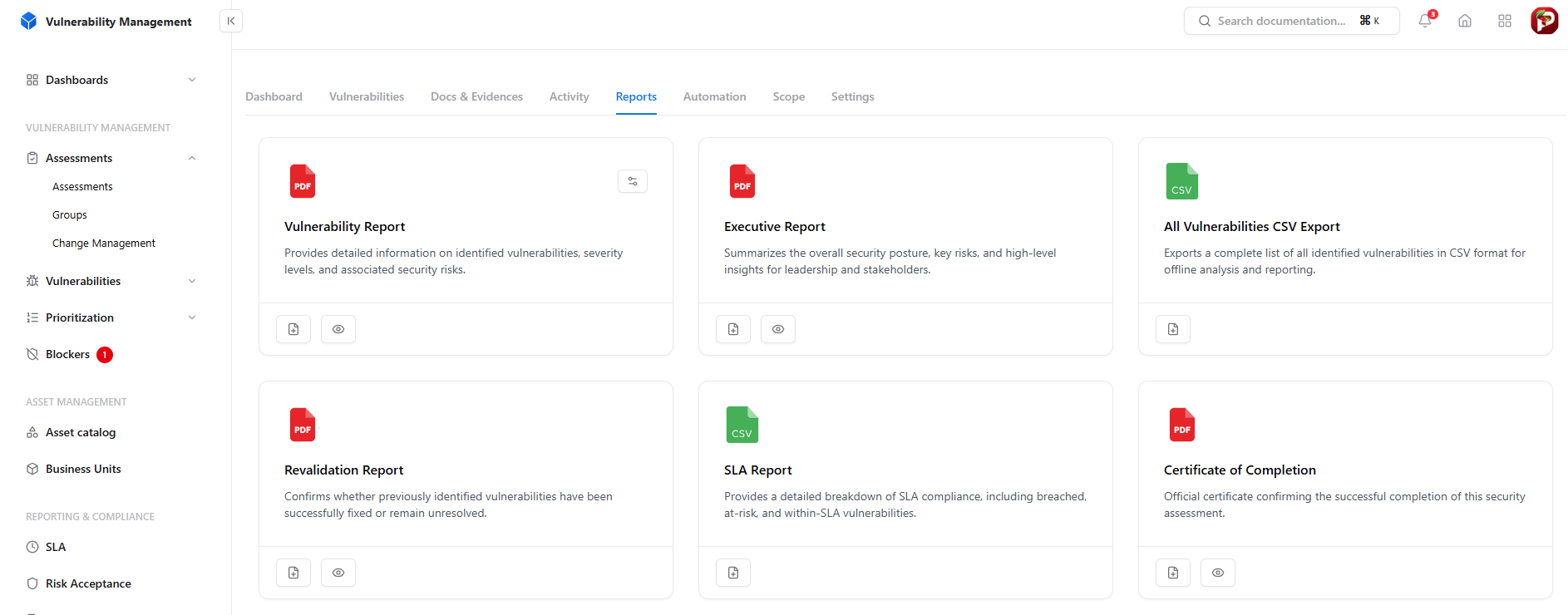
Vulnerability, executive, revalidation and SLA reports generated from the assessment.
Reports generated from the system that tracks findings and retests reflect the current state at the time they’re produced:
- Revalidation report: which findings were verified as fixed
- SLA report: which findings met their deadlines, breached them, or are at risk
- Certificate of completion: confirms the engagement was finished, which customers often request as well as auditors
Record every exception
Some findings won’t be fixed, for valid reasons. Auditors accept this when the decision is documented. Each accepted risk should record:
- Reason for acceptance: why the finding isn’t being fixed now
- Business justification: the business context for the decision
- Compensating controls: measures that reduce the risk in the meantime, such as a WAF rule, a network restriction or added monitoring
- Approver: the person accountable for the decision
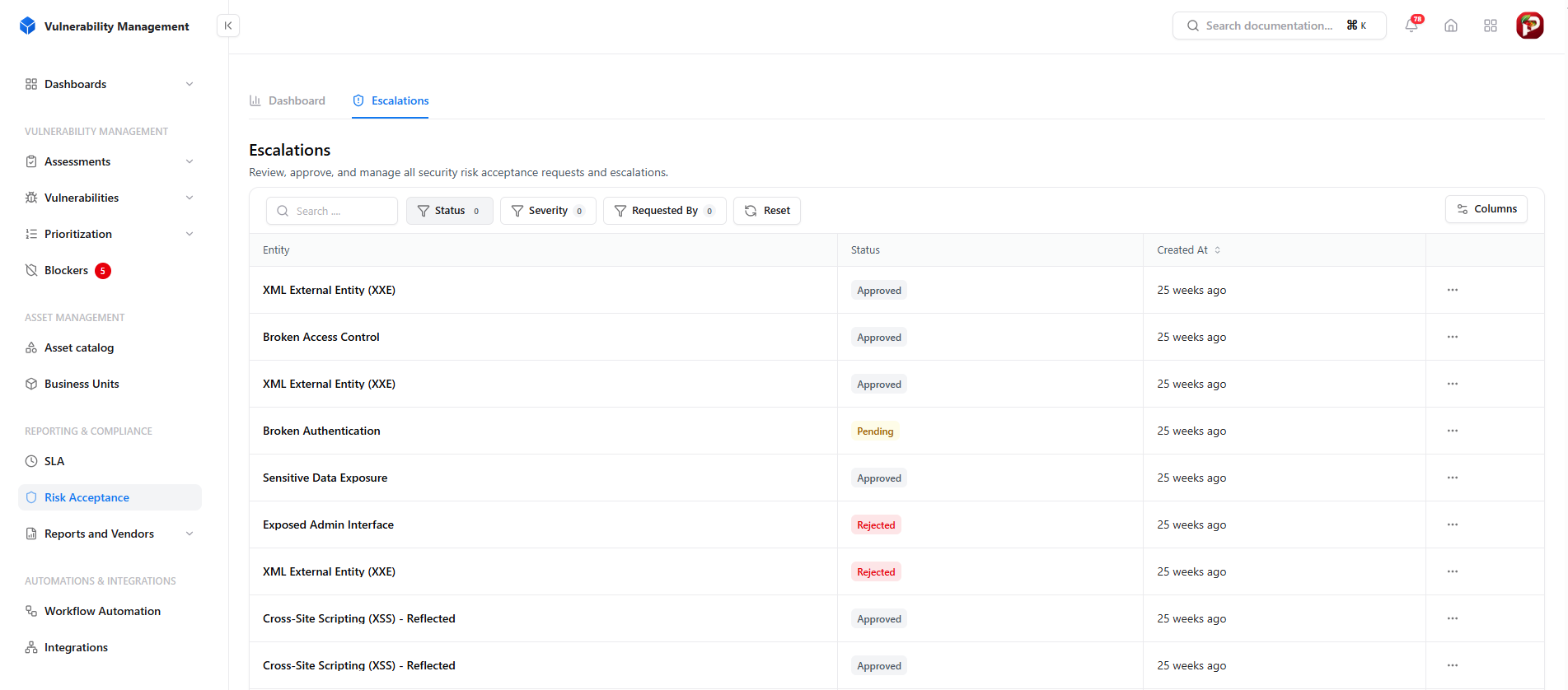
Every risk acceptance request is tracked as approved, pending or rejected, in one exception log.
Handle acceptances as formal requests that are approved or rejected, rather than as decisions made in meetings or chat. Rejected requests are useful evidence too, because they show that exceptions are genuinely reviewed. Add a review date to each acceptance, so decisions made for temporary reasons don’t remain in place indefinitely.
Example: responding to an audit sample
An auditor requests the following for one finding: scope and authorization, the finding evidence, proof of remediation, and the remediation timeline.
If evidence is scattered, the scope comes from a vendor email, the rules of engagement from a shared drive, and the finding from the PDF report. The fix date comes from the developer, and retest evidence has to be requested from the pentest vendor. Assembling it takes days.
If evidence is organized, the scope and rules of engagement are in the assessment. The finding holds the proof of concept, the activity history and the SLA status. The revalidation report confirms the fix. Assembling it takes minutes.
Across every finding an auditor samples, that difference quickly adds up to days of work.
Pentest audit evidence checklist
| Evidence | What it proves | Where it should live |
|---|---|---|
| Scope document | What was tested, and when | Assessment, Docs & Evidences |
| Signed rules of engagement | Testing was authorized | Assessment, Docs & Evidences |
| Pentest report | What was found | Assessment, Reports |
| Proof of concept per finding | The finding is real and reproducible | Finding record |
| Owner and activity history | Who was responsible, and what happened when | Finding record |
| SLA status | Fixes met agreed deadlines | SLA report |
| Retest evidence | Fixes were verified | Finding record and revalidation report |
| Risk acceptance records | Unfixed findings were formally approved | Risk acceptance log |
Conclusion
Audit readiness shouldn’t be a project that starts before an audit. It should follow from how the security team works every day: documents stored with engagements, history recorded on findings, fixes verified by retest, and exceptions approved on the record.
Snapsec VM supports this approach. Each assessment has its own Docs & Evidences store and activity history, each finding carries a timestamped trail, risk acceptances are tracked as approved, pending or rejected, and revalidation, SLA and executive reports are generated from the same data the team works in. Explore the live demo to see how it fits your pentest program.
Frequently asked questions
How long should pentest evidence be kept?
Follow your framework and your own retention policy. A practical minimum is to keep everything for the current audit period and the one before it, so an auditor can see that findings from the previous test were actually closed. Many teams keep it longer, because a new finding often makes them look back at older tests.
Does the vendor’s pentest report count as audit evidence?
It counts as evidence of what was found, but not of what happened next. The report can’t show who owned each fix, when it was deployed or whether it was retested. That evidence has to come from your own records.
Does SOC 2 require penetration testing?
SOC 2 doesn’t explicitly require a pentest. In practice, most auditors expect one as evidence that you monitor and evaluate your controls, and they will sample its findings the same way they would for PCI DSS or ISO 27001.
Should proof-of-concept evidence include real data or credentials?
No. Redact session tokens, API keys, passwords and personal data before storing PoC captures. The evidence only needs to show that the vulnerability existed and could be reproduced. Live credentials in an evidence store create a new risk of their own.
Can automated scan results replace pentest evidence?
No. Scans show that known issues were checked for, but they don’t show the manual testing that frameworks like PCI DSS expect. Keep scan results as supporting evidence alongside the pentest, not instead of it.